
Compare Mode
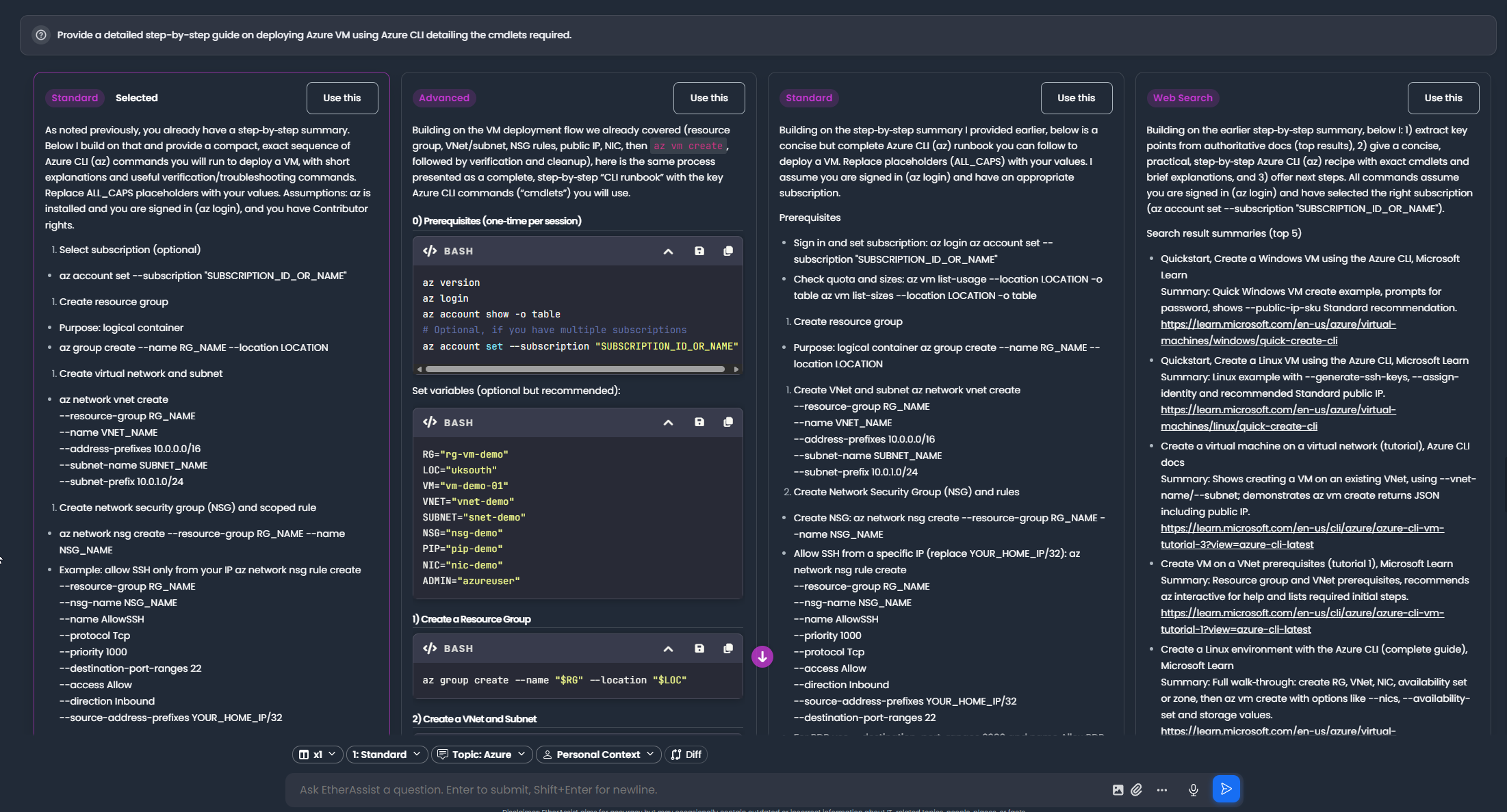
Compare Mode runs the same request through multiple available model routes so you can compare quality, structure, and usefulness.
Before you begin
- Write one prompt that all selected models can answer fairly.
- Attach only the files required for the comparison.
- Decide what makes one output better than another before you run the request.
- Use fewer outputs when speed or token use matters.
Use Compare Mode for
- Important customer-facing wording.
- Policy or procedure drafts.
- Complex technical explanations.
- Script review or documentation alternatives.
Run a comparison
- Open chat, an agent task, or a workflow step that supports multiple outputs.
- Set the output count, such as x2, x3, or x4.
- Choose the model route for each output slot.
- Submit the same request once.
- Review each output side by side.
- Select the output you want to keep.
- Continue in chat, refine, or export the selected output.
Expected result: the selected output remains available, and you can show all outputs again when you need to compare the alternatives.
Review criteria
| Criterion | What to check |
|---|---|
| Accuracy | Does the output match the evidence and task? |
| Completeness | Are important constraints missing? |
| Clarity | Is the answer easy to use? |
| Safety | Does it avoid risky assumptions or unsafe instructions? |
| Format | Does it match the requested output? |
Select an output
Choose the response you want to continue with, then refine, export, or continue in chat.
Tip: If all outputs miss the mark, improve the prompt and rerun with fewer model routes before increasing the comparison size.
Tips
- Keep names, prompts, and configuration values specific to the task you are performing.
- Check role, subscription, region, and tenant policy when a feature is not visible.
Troubleshooting
| Problem | What to check |
|---|---|
| Outputs are too similar | Compare different model routes or make the review criteria more specific. |
| Outputs disagree | Check the source material and ask for assumptions or evidence before selecting one. |
| The selected output is hidden | Use Show all outputs to display the comparison grid again. |
| Comparison used too many tokens | Reduce the output count or shorten the source context. |