
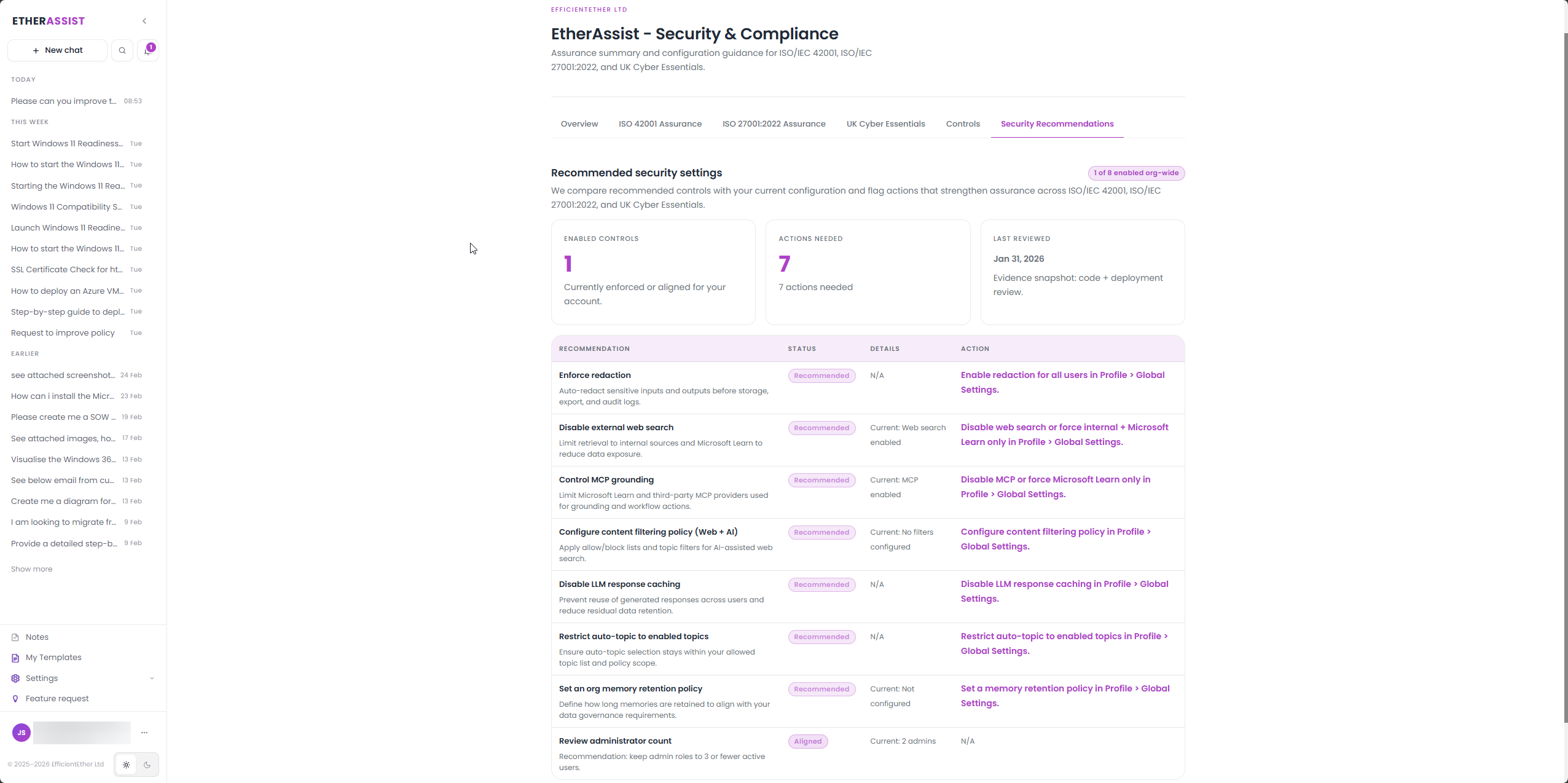
Security recommendations
EtherAssist helps turn defensive findings into prioritised, customer-safe recommendations that can be tracked through remediation and validation.
Before you begin
- Sign in with an account that has access to this area.
- Confirm the organisation, tenant, or source material you need to work with.
- Keep customer data, secrets, and screenshots within your organisation's handling policy.
Prerequisites
- A scoped and authorised finding, audit note, or configuration concern.
- Evidence that supports the finding.
- Owner, priority, and target-date expectations if available.
Create a recommendation
- Describe the finding and affected environment.
- State the business or security impact.
- Ask EtherAssist to produce a recommendation with owner, evidence, priority, and validation steps.
- Review the recommendation for accuracy and scope.
- Track the action through your normal change or risk process.
Recommended structure
| Section | Purpose |
|---|---|
| Finding | What was observed. |
| Impact | Why it matters. |
| Priority | Urgency and risk level. |
| Recommendation | What should be changed. |
| Owner | Who should act. |
| Evidence | What supports the finding. |
| Validation | How the fix will be confirmed. |
Safety boundary
Keep security work defensive, scoped, and authorised. Do not ask for exploit steps, credential attacks, unrestricted scanning, or instructions that could harm systems.
Expected result
You have a clear remediation item that a security, IT, or compliance owner can review, approve, and validate.
Tips
- Keep names, prompts, and configuration values specific to the task you are performing.
- Check role, subscription, region, and tenant policy when a feature is not visible.
Troubleshooting
| Issue | What to do |
|---|---|
| The recommendation is not actionable | Add current state, target state, owner, and validation evidence. |
| The request includes offensive steps | Reframe the work as defensive validation or remediation. |
| The priority is disputed | Ask for a separate impact and likelihood summary before assigning priority. |