
Create PowerShell scripts
EtherAssist can help draft, explain, and review PowerShell for Microsoft 365, Graph, Azure, Windows, and operational automation.
Before you begin
- Confirm the target platform, such as Microsoft Graph, Azure, Exchange Online, Intune, or Windows.
- Decide whether the script must be read-only or can make changes.
- Know the PowerShell version you need, such as Windows PowerShell 5.1 or PowerShell 7.
- Review authentication, permissions, and test environment requirements before running generated code.
Create a script
- Open Chat.
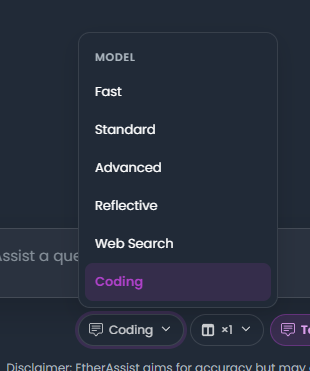
- Select Coding for code-focused output, or Standard for simple script drafts.
- State the PowerShell version, target service, permission model, expected input, and expected output.
- Ask for a read-only script first unless you explicitly need a change script.
- Request comments, assumptions, and safety checks.
- Review the generated script before saving or running it.
Example:
Create a PowerShell 7 read-only script that accepts a CSV of device names and outputs a table of readiness status. Include comments where Microsoft Graph calls would be added after approval.
Expected result: EtherAssist returns a script with the requested inputs, outputs, and review notes.
Refine the script

- Ask EtherAssist to explain the script line by line.
- Request error handling, logging, or
-WhatIfsupport where useful. - Ask for the minimum permissions required.
- Ask for a rollback or validation step before using the script in production.
Safety checklist
- Test in a non-production tenant, lab, or limited pilot group first.
- Do not run generated scripts blindly in production.
- Check modules, scopes, and tenant identifiers before execution.
- Remove secrets, tokens, and customer data before sharing script examples.
- Have a peer review destructive commands such as remove, delete, revoke, disable, or reset.
Troubleshooting
| Issue | What to check |
|---|---|
| Module import fails | Confirm the module name, version, and installation source. |
| Authentication fails | Check tenant, app registration, delegated scopes, and admin consent. |
| Output is incomplete | Provide sample input and ask EtherAssist to handle missing or malformed rows. |
| Script is too risky | Ask for a read-only assessment version before requesting remediation code. |
Next steps
Tips
- Keep prompts, names, and configuration values specific to the task you are performing.