
Document Manager
Document Manager stores reusable files that can be attached to chats, templates, and agent tasks. Use it when the same source material will be used more than once.
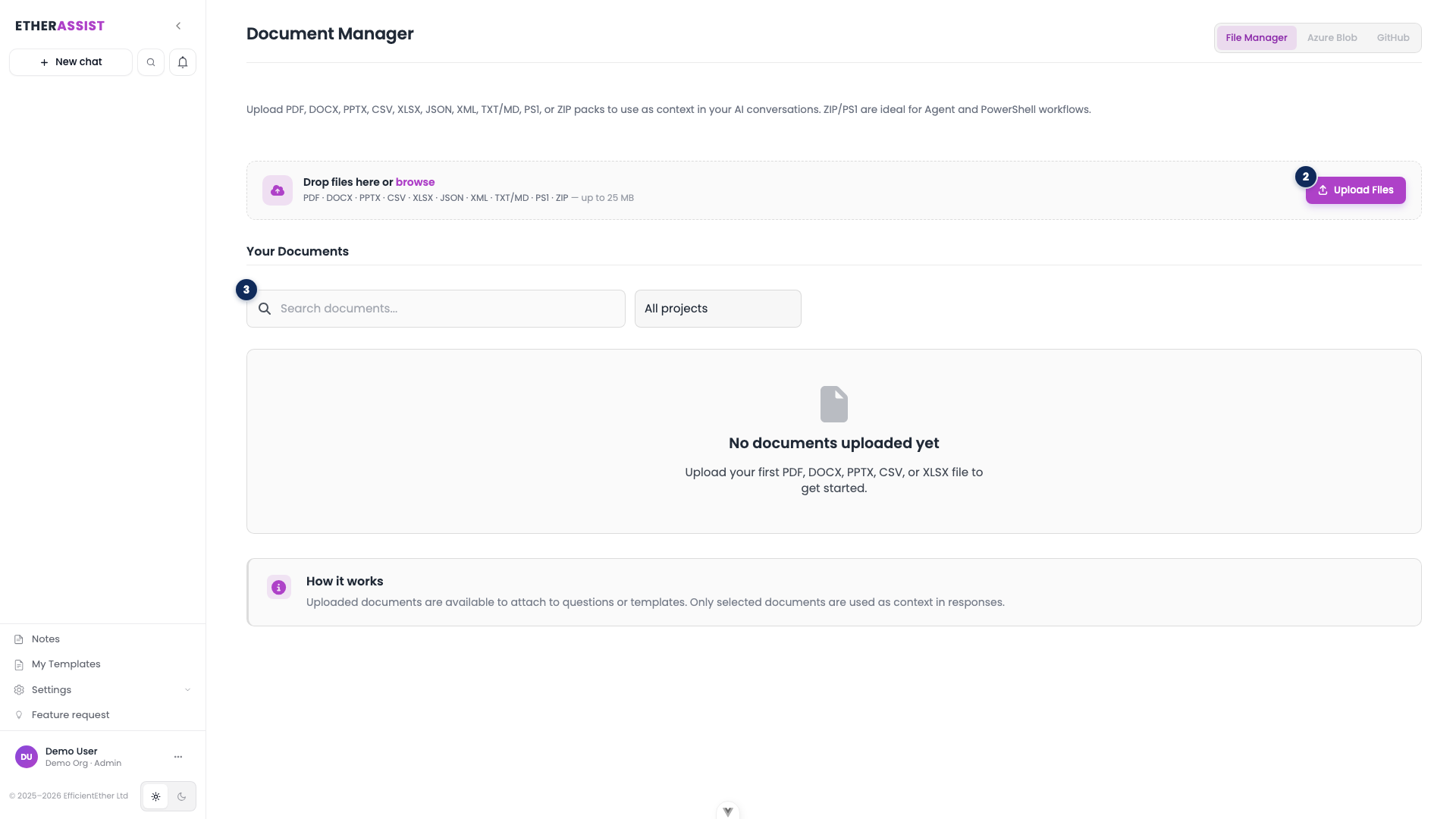
The numbered pins show the main controls on the Document Manager page.
| Pin | Area | Use it to |
|---|---|---|
| 2 | Upload Files | Add a new document by drag-and-drop or file browse. |
| 3 | Search documents | Find an existing document in the list by name. |
Source switcher tabs at the top right (File Manager, Azure Blob, GitHub) let you choose where the documents come from, and the All projects filter narrows the list by project.
Before you begin
- Confirm the file is approved for use in EtherAssist.
- Remove secrets or unnecessary personal data.
- Use clear file names so other users understand the purpose.
- Check that your role allows uploads and document access.
Open Document Manager
- Sign in to EtherAssist.
- Select Document Manager from the sidebar.
- Review existing documents before uploading duplicates.
- Use projects or naming conventions where your tenant has adopted them.
Preview a document
- Find the document in the list.
- Select the preview action on the row.
- Confirm the content, file type, and relevance.
- Close the preview before attaching or sharing the document.
For tabular files, confirm the columns and sample rows are readable before using the file in a prompt.
Use a document in chat or automation
- Open the chat, template, or agent task that needs the source material.
- Attach the document from Document Manager.
- Explain what EtherAssist should use from the document.
- Ask for citations or section references when accuracy matters.
- Review the output against the source before sharing.
Troubleshooting
| Issue | What to check |
|---|---|
| Document is missing | Confirm your role, organisation, and document permissions. |
| Preview does not render | Download or inspect the original file if policy allows, then re-upload a supported format. |
| Answer ignores the file | State exactly which document and section EtherAssist should use. |
| Duplicate files confuse users | Archive or remove obsolete copies according to tenant policy. |