
Managing Memories
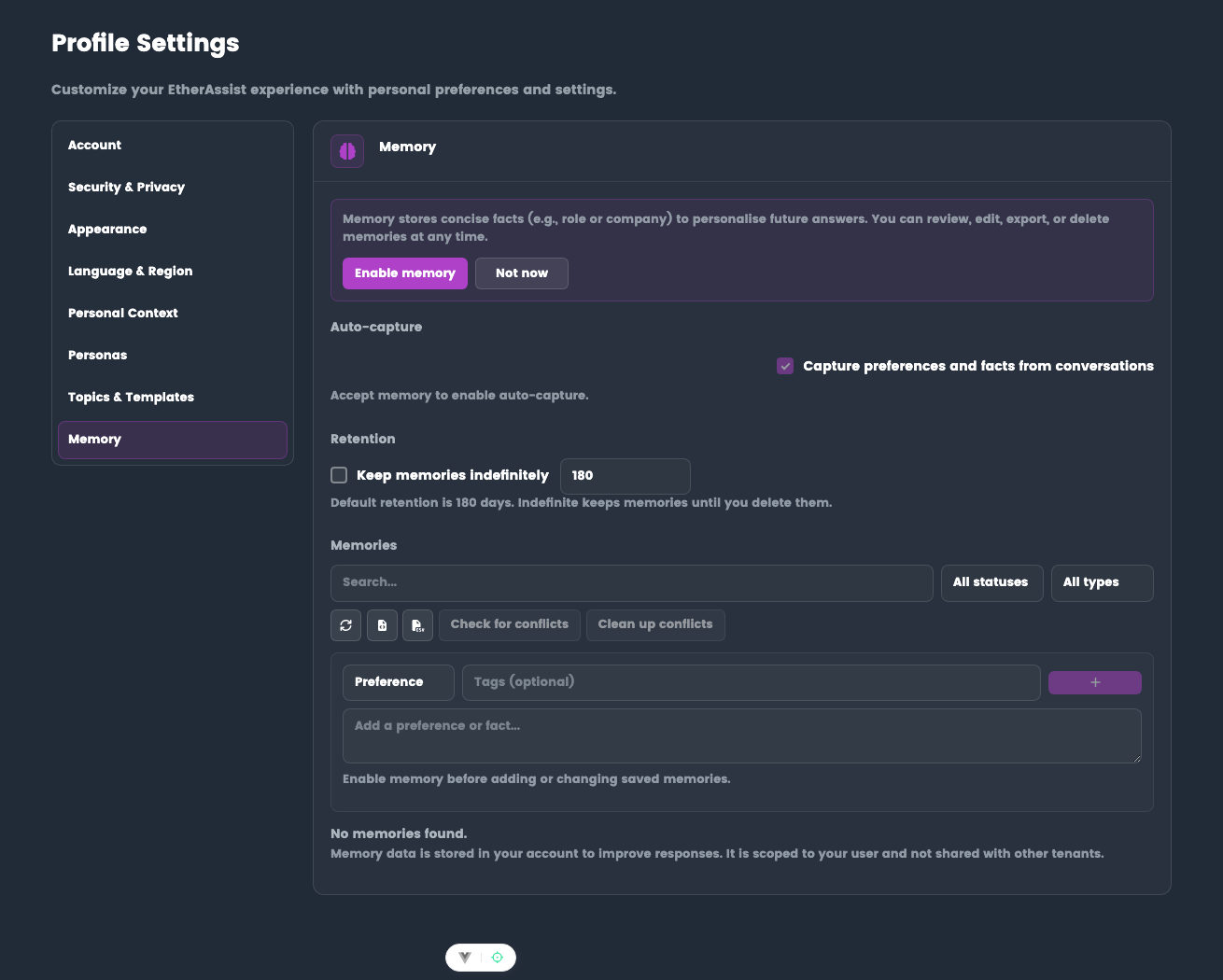
View, add, edit, and organize memories in Settings → Profile → Memory.
Before you begin
- Sign in to EtherAssist.
- Enable memory before expecting saved memories to influence responses.
- Review memory content for accuracy and sensitivity before activating it.
View memories
- Search - Filter by keyword
- Status filter - All, Active, Suggested, Disabled
- Type filter - Preference, Fact, Project, Constraint
- Pagination - 5, 10, or 20 per page
Add a memory
- Select Memory type (Preference, Fact, Project, Constraint)
- Enter Content - Be specific and concise (1-3 sentences)
- Add Tags (optional) - For organization
- Click Add Memory
Good content:
IT Manager at TechCorp (500 employees), responsible for Microsoft 365
and infrastructure security. Using Azure AD Premium P2 and Intune.
Avoid: Vague content ("I work in IT"), sensitive data, temporary context.
Review suggested memories
Auto-captured memories appear with "Suggested" status:
- Review the content for accuracy
- Activate - Confirm and use in future responses
- Delete - Reject the suggestion
Edit, disable, delete
- Edit - Update content, type, or tags
- Disable - Turn off without deleting (can re-enable later)
- Delete - Permanently remove (cannot be undone)
Export
- Export JSON - Full data with IDs and dates
- Export CSV - Spreadsheet-friendly format
Retention
- Indefinite (default) or time-limited (e.g., 180 days)
- Admin may enforce org-wide retention policies
- Configure in Settings → Profile → Memory → Retention
Best practices
- Review suggested memories promptly
- Keep memories current - update when your role or stack changes
- One fact per memory (avoid combining unrelated info)
- Use tags consistently for easy filtering
- Export periodically as backup
Tips
- Keep prompts, filters, and configuration values specific to the task you are performing.
- Check role, subscription, region, and tenant policy when a feature is not visible.
Troubleshooting
| Issue | What to check |
|---|---|
| Suggested memory is inaccurate | Delete it or edit the text before activating it. |
| Old memory affects responses | Disable or delete the stale memory, then start a new chat. |
| Export is needed for review | Export JSON for full detail or CSV for spreadsheet review. |