
Topics
Topics help EtherAssist ground answers in a specialist area such as Microsoft 365, Azure, Intune, Windows, PowerShell, VDI, application deployment, or compliance. Use topics when a general answer is not specific enough.
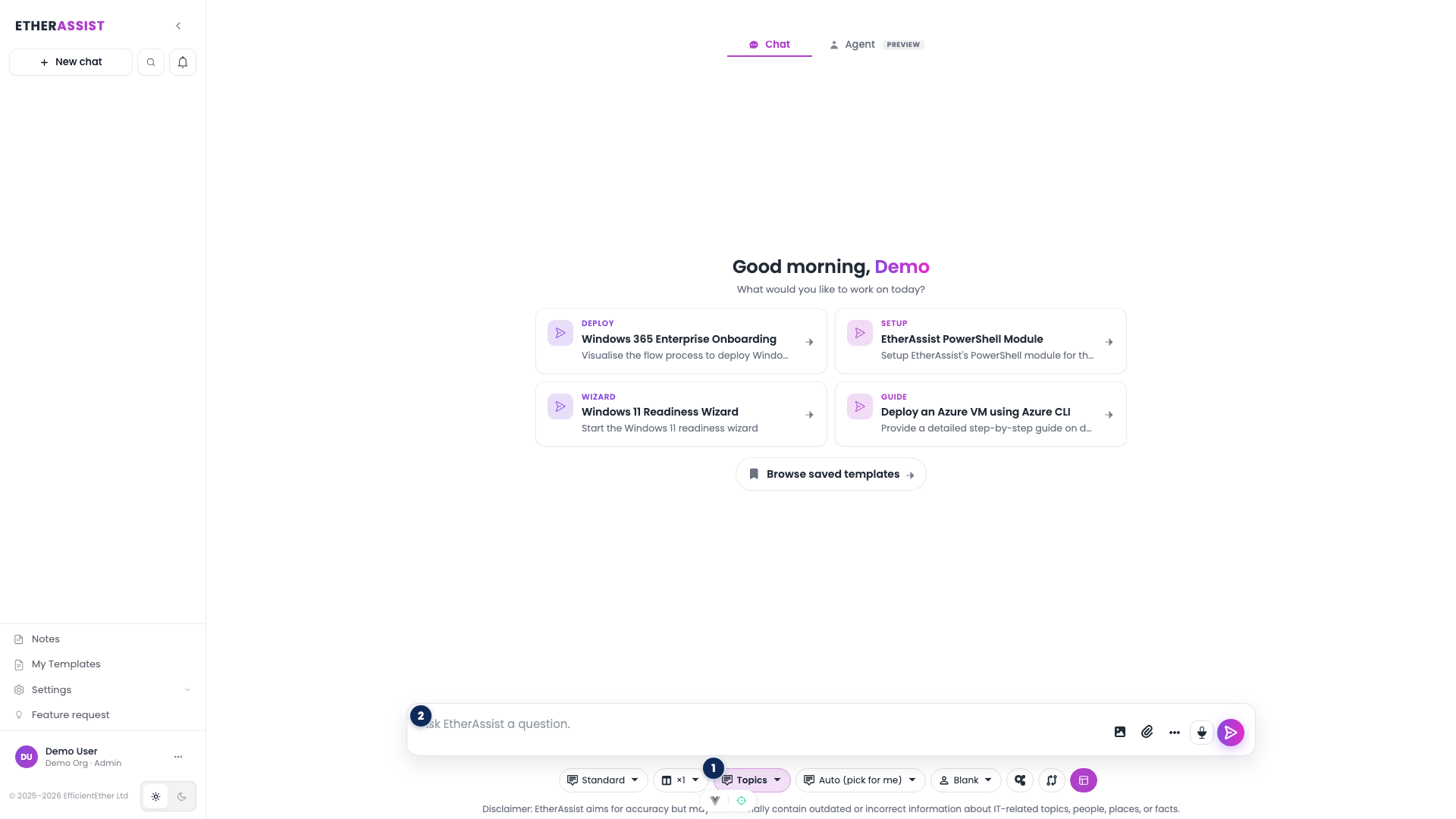
The numbered pins show the topic controls on the chat composer.
| Pin | Area | Use it to |
|---|---|---|
| 1 | Assistant mode chip | Switch between General (no topic) and Topics (specialist grounding). |
| 2 | Composer textarea | Enter your question after choosing a mode and topic. |
The topic selector chip sits next to the mode chip. Use Auto when EtherAssist should choose the best visible topic, or open Topics to choose a specific area yourself.
Before you begin
- Decide whether the task needs specialist grounding.
- Confirm the topic is visible in your tenant.
- Provide the product version, platform, or compliance framework when relevant.
- Attach supporting files only when they are needed.
Choose a topic in chat
- Open chat.
- Choose Auto when EtherAssist should select from your visible topics.
- Choose Topics when you know the specialist area.
- Select the topic or topics that match the request.
- Ask a focused question with the desired output format.
Expected result: EtherAssist uses the selected topic context where available and returns a more relevant answer.
Use topic feedback

- Review the answer for accuracy and relevance.
- Use feedback controls when the answer is wrong, incomplete, or poorly grounded.
- Add a short explanation so the issue can be investigated.
- Re-run the prompt with clearer context when needed.
Good topic prompts
| Task | Add this context |
|---|---|
| Microsoft 365 or Graph | Tenant scenario, permissions, endpoint, and expected result. |
| Intune or Windows | Platform version, assignment scope, policy type, and error text. |
| PowerShell | Shell version, modules, input data, and output format. |
| Compliance | Framework, control objective, evidence, and review audience. |
| VDI or DaaS | Platform, user group, host pool or device context, and symptom. |
Troubleshooting
| Issue | What to check |
|---|---|
| Topic is missing | Confirm tenant settings and subscription. |
| Answer is too generic | Select a specific topic and include product/version details. |
| Topic answer conflicts with source material | Attach the source and ask EtherAssist to use it explicitly. |
| Feedback button is unavailable | Use a follow-up prompt or support channel to report the issue. |