
Data region and migration
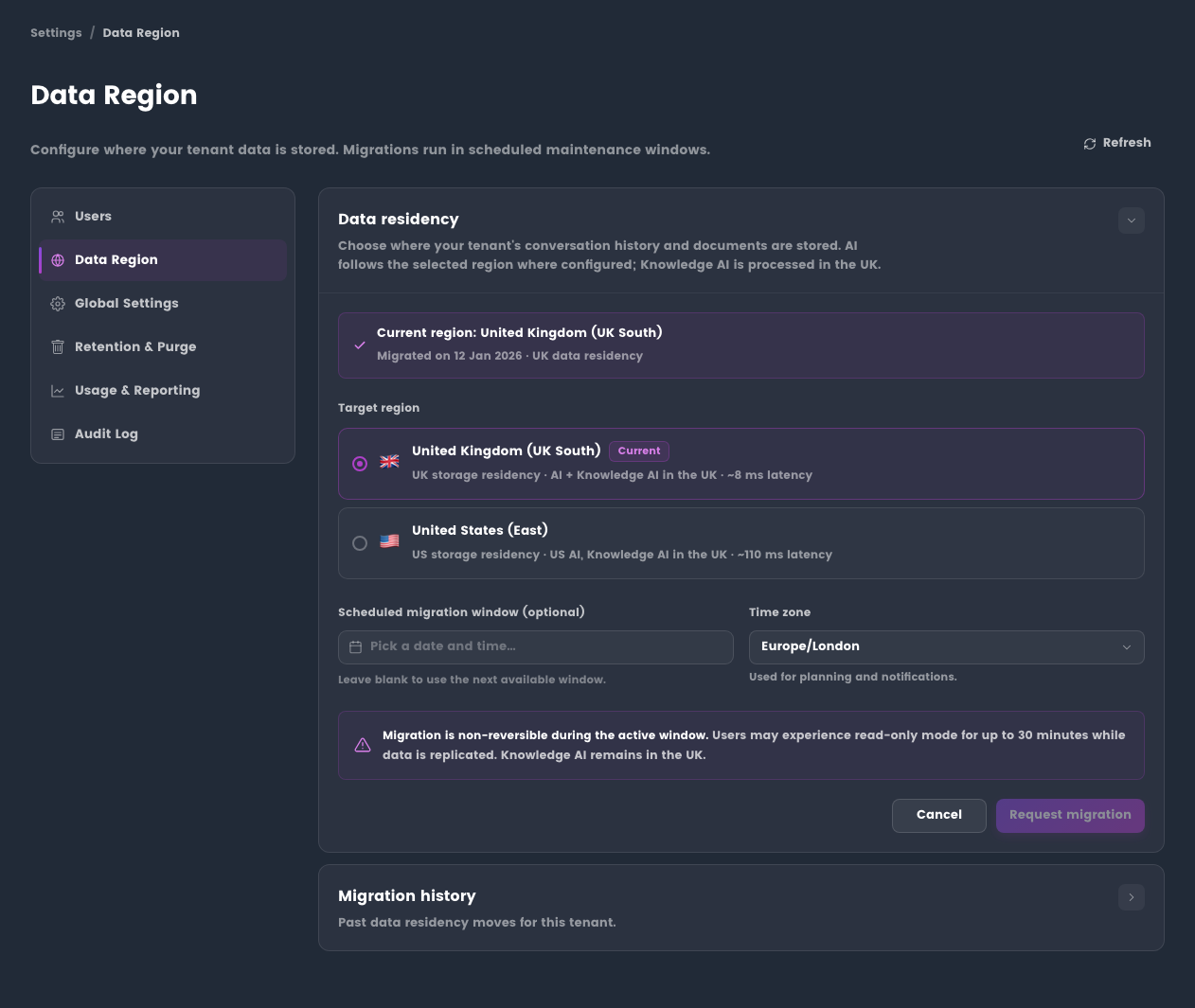
Administrators can review the organisation data region and request migration where the service supports the target region.
Before you begin
- Sign in with an administrator account.
- Confirm the organisation that needs review.
- Check any customer, contract, or regulatory residency requirements before requesting a change.
What the page shows
- Current organisation data region.
- Available target regions for the organisation.
- Request status for any in-progress migration.
- High-level notes about AI and knowledge processing boundaries.
Before requesting migration
- Confirm the business reason for migration.
- Review any contract, compliance, and customer residency requirements.
- Notify administrators and active users.
- Avoid starting major document or workflow activity during the expected migration window.
- Contact the EtherAssist support or account team when the target region is available for your organisation.
Expected result: the region request is reviewed with the correct organisation, target region, and timing expectations.
Tips
Regional availability, processing locations, and migration options can change. Verify the current production configuration before making customer commitments.
Troubleshooting
| Issue | What to check |
|---|---|
| Target region is not shown | Confirm the region is available for your plan and organisation. |
| Migration request is pending | Check whether the support or account team has confirmed the migration window. |
| User sees old region detail | Ask the user to refresh or sign out and back in after the migration completes. |